Installation of the OpenStack CLI
The OpenStack CLI provides programmatic access to many functions of the NETWAYS Cloud, which is built on OpenStack.
Whether for administrative tasks, recurring jobs, or “cleanup work”, the OpenStack CLI makes it possible to interact with the NETWAYS Cloud from scripts, pipelines, or even your own applications.
Prerequisites
Using the OpenStack CLI requires Python version >=3.8.
Installation
The OpenStack CLI, like OpenStack itself, is written in Python. The packages needed for the CLI can therefore be installed from PyPI with Python’s package manager pip:
pip install python-openstackclient \
  python-barbicanclient \
  python-cinderclient \
  python-designateclient \
  python-glanceclient \
  python-heatclient \
  python-magnumclient \
  python-neutronclient \
  python-novaclient \
  python-octaviaclient \
  gnocchiclient
Number of Clients
The OpenStack project consists of a large number of micro‑services that work together (Barbican, Cinder, Designate, Glance, etc.). For interacting with each of these services there is a dedicated client that is used for that interaction.
For this reason the installation of the OpenStack CLI consists of several packages.
Configuration
In the context of the NETWAYS Cloud the OpenStack CLI can be configured in two ways:
- Direct access to a specific project using the OpenStack RC file downloadable from OpenStack's web interface Horizon.
- General access to all possible projects using the NWS-ID.
Below you will find the procedures for both variants.
Configuration via OpenStackRC.sh
Configuring the OpenStack CLI for a specific project is done with a Bash script called openrc.sh. This can be downloaded from OpenStack’s web interface Horizon.
-
Log in to the OpenStack project via cloud.netways.de with the project user.
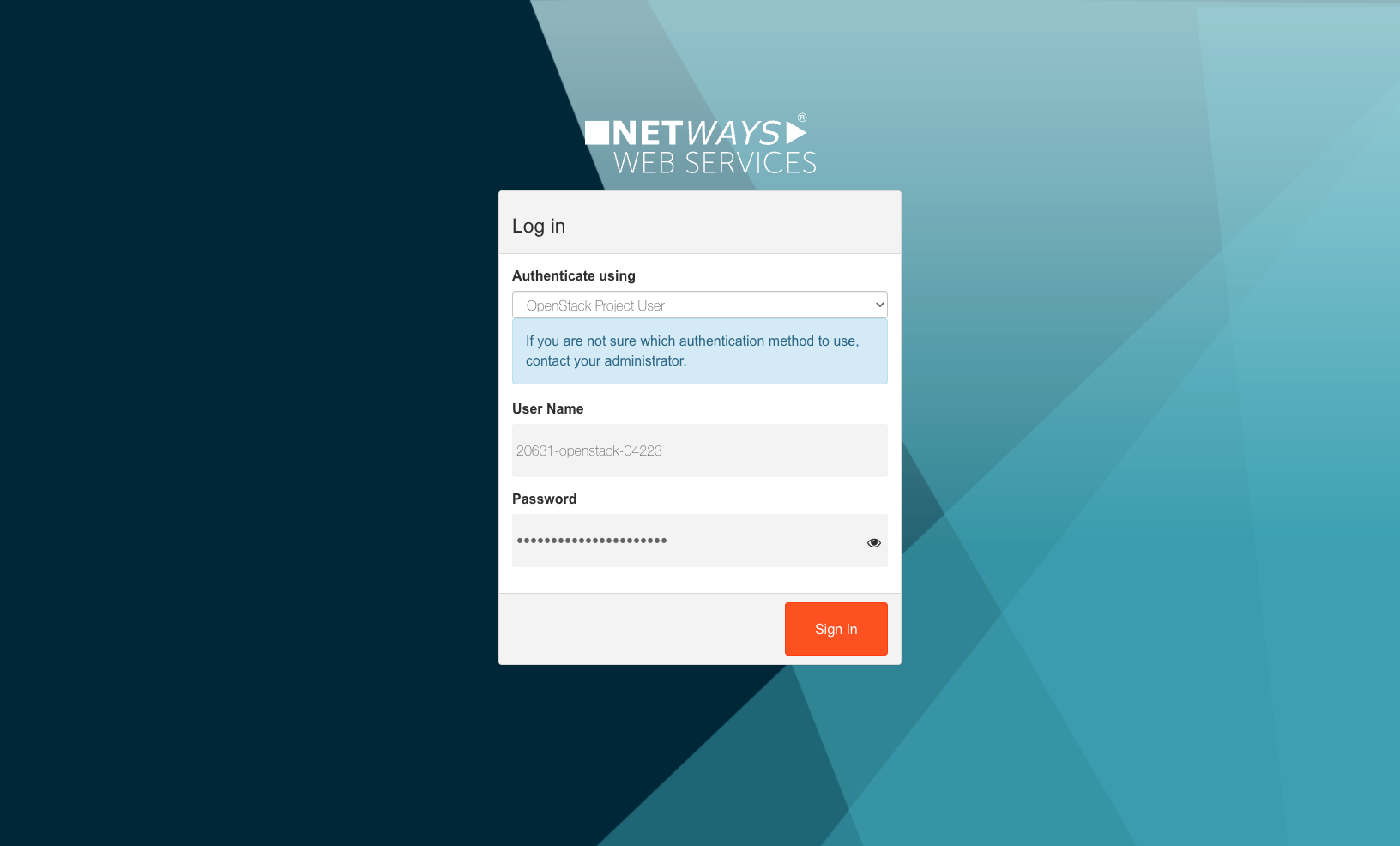
Project User
The project user can be created and activated in the MyNWS portal.
More information is available in the documentation under Setting up the OpenStack project user.
-
After a successful login, go to the API Access tab and click Download OpenStack RC File to download the required file.
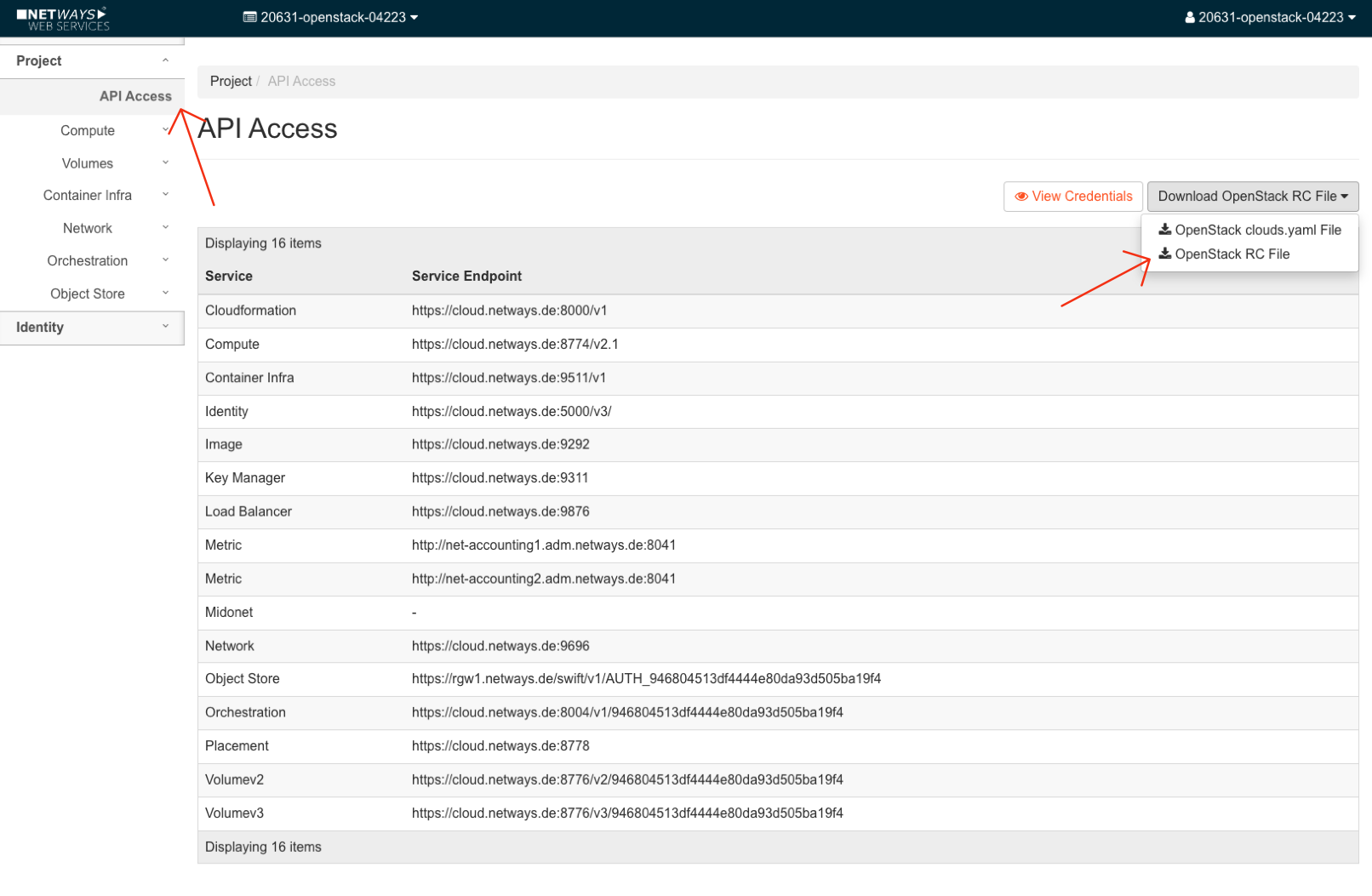
-
The downloaded file is named according to the pattern
<project-id>-openrc.shand must now be sourced. Afterwards you will be prompted for the password of the project user again:source ~/Downloads/20631-openstack-04223-openrc.sh Please enter your OpenStack Password for project 20631-openstack-04223 as user 20631-openstack-04223:If the entered password is correct, the script produces no further output.
-
You can now use the OpenStack CLI, for example to list existing
Networksin the OpenStack project:openstack network list +--------------------------------------+-----------------------+---------------------------------------------------------------------------+ | ID | Name | Subnets | +--------------------------------------+-----------------------+---------------------------------------------------------------------------+ | 210e26d7-942f-4e17-89b2-571eee87d7e4 | public-network | 06d6f5ba-c2fd-4025-a877-000edf58bea1, 220b5e2f-e086-4c00-8ddb- | | | | fbbd539da3ce, 68adf345-73c8-42f6-ae65-bc705bf35651, cd9abbed- | | | | fe5b-40a4-b53c-1d42d2732594, d4a4d8cf-a140-46f1-95bd-d213128aa541, | | | | ec7b7b20-0bcb-4dc9-87cf-11249689bfd5 | | 62c630db-fd44-40e5-a9be-b89b8ffeb079 | ExtNetwork | 0593b5ff-0ac2-410a-ac0e-0d74f1e8e7dc | | ded593e8-8159-4919-a6d3-44c8751dbf3b | 20631-openstack-04223 | 17f3dce1-7ff2-4248-89f4-9331d476238c | +--------------------------------------+-----------------------+---------------------------------------------------------------------------+
Sourcing the OpenStack RC file
The OpenStack RC file must be sourced again for each terminal session in order to provide the required environment variables for the OpenStack CLI and to log in to the OpenStack API.
Configuration via NWS-ID
Configuring the OpenStack CLI for all projects that are made available to a user via the NWS-ID also requires an OpenStack RC file. However, this file can be pre‑configured and downloaded from the MyNWS portal:
-
Download the pre‑configured OpenStack RC file from the OpenStack page in the MyNWS portal.
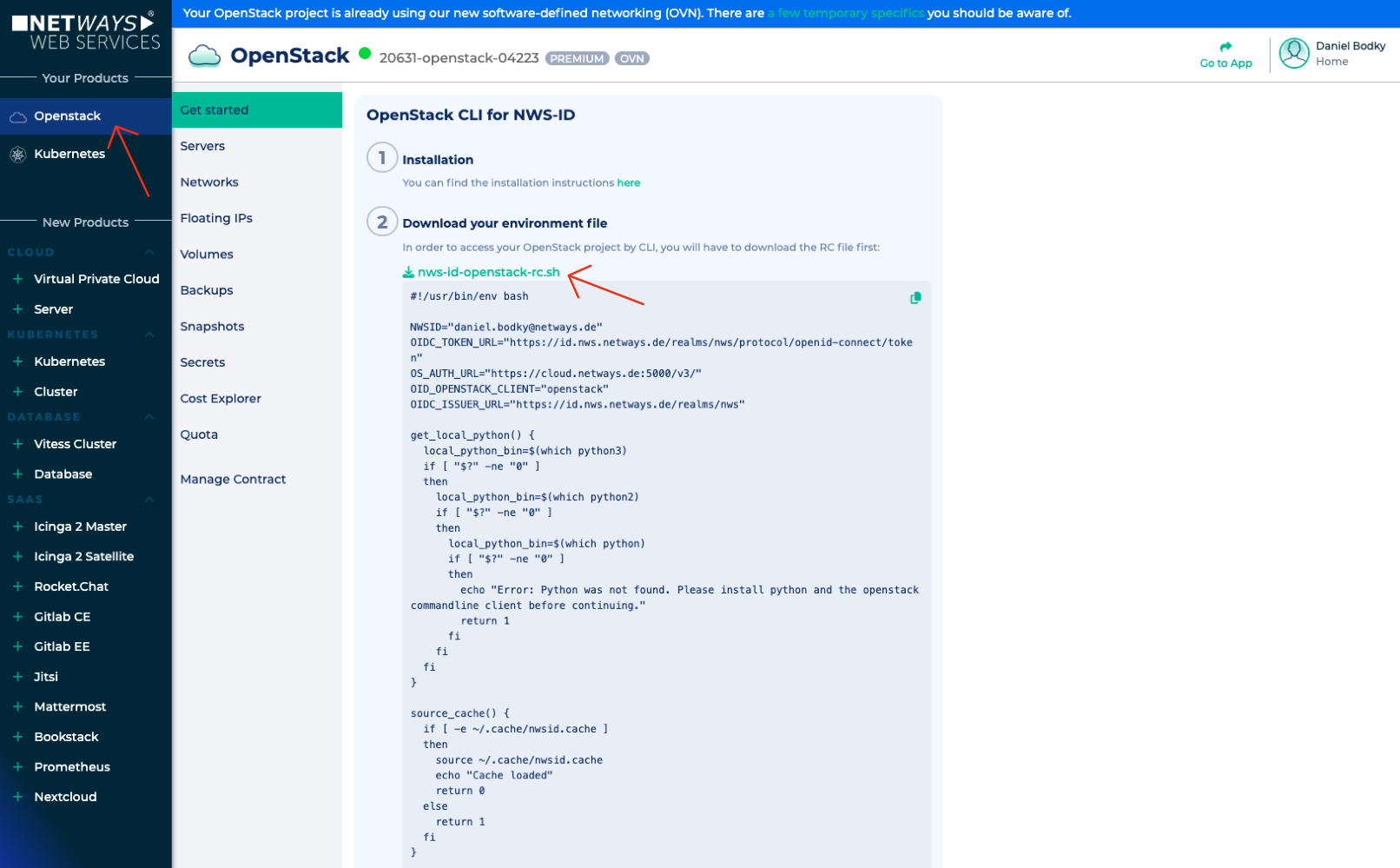
-
Install the
kubeloginCLI for logging in with the NWS-ID. More information can be found in the documentation under Installation of the kubelogin CLI. -
The OpenStack RC file now has to be sourced. If the
kubeloginCLI is installed, a browser window will open for login with the NWS-ID. Otherwise, login is performed by entering credentials in the terminal. -
After a successful login in the browser or terminal, the desired project can be selected for the current and subsequent sessions.
-
You can now work with the OpenStack CLI:
openstack network list
+--------------------------------------+-----------------------+---------------------------------------------------------------------------+
| ID                                   | Name                  | Subnets                                                                   |
+--------------------------------------+-----------------------+---------------------------------------------------------------------------+
| 210e26d7-942f-4e17-89b2-571eee87d7e4 | public-network        | 06d6f5ba-c2fd-4025-a877-000edf58bea1, 220b5e2f-e086-4c00-8ddb-            |
|                                      |                       | fbbd539da3ce, 68adf345-73c8-42f6-ae65-bc705bf35651, cd9abbed-             |
|                                      |                       | fe5b-40a4-b53c-1d42d2732594, d4a4d8cf-a140-46f1-95bd-d213128aa541,        |
|                                      |                       | ec7b7b20-0bcb-4dc9-87cf-11249689bfd5                                      |
| 62c630db-fd44-40e5-a9be-b89b8ffeb079 | ExtNetwork            | 0593b5ff-0ac2-410a-ac0e-0d74f1e8e7dc                                      |
| ded593e8-8159-4919-a6d3-44c8751dbf3b | 20631-openstack-04223 | 17f3dce1-7ff2-4248-89f4-9331d476238c                                      |
+--------------------------------------+-----------------------+---------------------------------------------------------------------------+