Cluster Upgrades
Kubernetes Upgrades
Supported Versions
| <=v1.26 | v1.31 | v1.32 | v1.33 | v1.34 | v1.35 | v1.36 | |
|---|---|---|---|---|---|---|---|
| Supported | ✔️ | ✔️ | ✔️ | ||||
| Best Effort | ✔️ | ✔️ | ✔️ | ||||
| Deprecated | ✔️ |
Performing an Upgrade of a NETWAYS Managed Kubernetes® Cluster
It is recommended to upgrade the control‑plane nodes by two minor versions at a time. Starting with Kubernetes v1.27, the control‑plane nodes can also be three versions ahead (Control‑plane: v1.30, Nodes: v1.27). Afterwards you can upgrade additional node groups to the version of the control‑plane nodes. This way a minor version can be skipped on the nodes.
If the existing node groups are already older, it is advisable to rotate them and replace them with new ones. Because of a limitation, new nodes of a node group always start with the originally launched CoreOS version. An up‑to‑date CoreOS version that matches the corresponding Kubernetes version is always a prerequisite for an upgrade. More information about CoreOS updates can be found here.
Replacing Worker Node Groups
Replacing additional worker node groups is usually faster than upgrading existing worker node groups.
It is sufficient to create new node groups (the nodes are created with the current Kubernetes version of the control‑plane nodes) and delete the old ones. This should only be done when you are sure that no persistent data is stored on the nodes’ file systems.
Starting the Upgrade of the Control‑Plane Nodes
Info
The following steps only upgrade the control‑plane node group and the default‑worker node group.
Information on upgrading additional node groups can be found in the next section.
To upgrade Kubernetes, select Upgrade Kubernetes from the cluster’s context menu. Then choose the desired Kubernetes version and start the upgrade by clicking Upgrade.
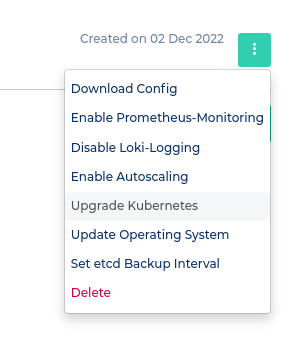
Upgrade Kubernetes not available?
If no upgrade button is visible, you must first disable OS Upgrades.
Before Upgrading
During a Kubernetes upgrade, OS upgrades must not be enabled.
Before the upgrade, ensure that the cluster status is healthy.
Upgrading Additional Worker Nodes
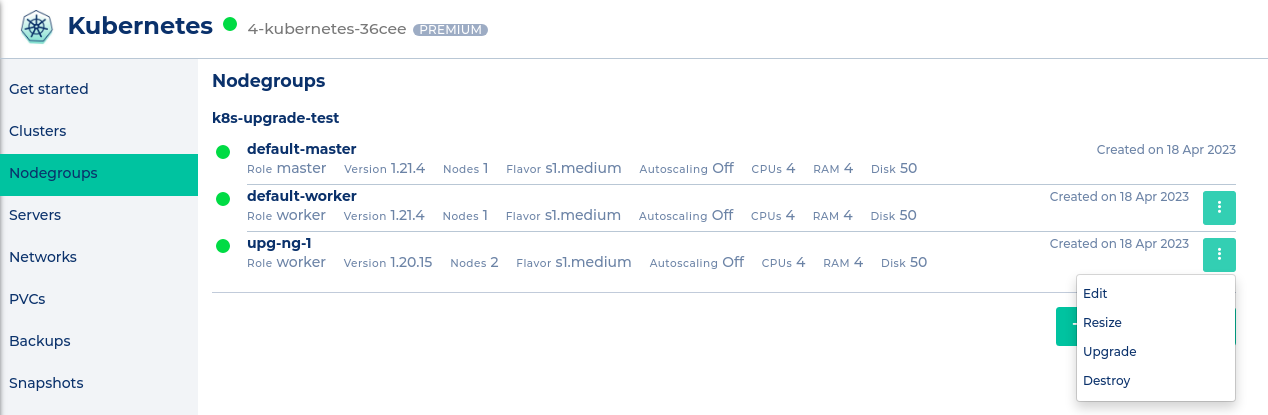
Additional worker nodes can be upgraded from the Nodegroup menu. In the node‑group context menu, select the Upgrade option and start the upgrade by clicking Upgrade! in the popup.
Kubernetes Version of Additional Worker Node Groups
The Kubernetes version of additional node groups cannot be selected manually.
It is only possible to upgrade them to the current control‑plane version.
Updated Components
Depending on the node group, different Kubernetes components are updated during an upgrade.
Control‑Plane Nodes
- etcd
- kube‑apiserver
- kube‑controller‑manager
- kube‑scheduler
- kube‑proxy
- kubelet
Worker Nodes
- kube‑proxy
- kubelet
Upgrading Cluster Services
In addition to the Kubernetes components, the cluster services in the kube-system namespace are also upgraded.
Upgrade Procedure
When upgrading a NETWAYS Managed Kubernetes® cluster, nodes are upgraded one at a time.
Node Draining
During the upgrade each node is drained, i.e., all Pods running on it are terminated and moved to other nodes.
You should ensure that sufficient free resources are available in the cluster to allow a quick reassignment of the Pods.
Upgrade Duration
An upgrade takes roughly 5 to 10 minutes per node.
Support for Upgrades
It is recommended to use the assistance of a MyEngineer® when upgrading a NETWAYS Managed Kubernetes® cluster—especially in production environments.
Support helps identify potential compatibility issues and keep upgrade‑related downtime to a minimum.