Setting up kubectl
kubectl is the official CLI of the Kubernetes project.
It enables full‑featured interaction with existing Kubernetes clusters via their API.
In the context of NETWAYS Managed Kubernetes®, kubectl can be used either with a generic Admin configuration or in the context of an NWS-ID.
Installation of kubectl
kubectl is available for all common operating systems. Installation can be done either via package managers or by downloading the binary.
Installation as Binary
The Kubernetes project provides release binaries for kubectl for at least all supported Kubernetes versions:
ARCH="arm64"
if [ $(uname -m) = "x86_64" ]; then
    ARCH="amd64"
fi
curl -LO "https://dl.k8s.io/release/$(curl -L -s https://dl.k8s.io/release/stable.txt)/bin/linux/${ARCH}/kubectl"
sudo install -o root -g root -m 0755 kubectl /usr/local/bin/kubectl
ARCH="arm64"
if [ $(uname -m) = "x86_64" ]; then
    ARCH="amd64"
fi
curl -LO "https://dl.k8s.io/release/$(curl -L -s https://dl.k8s.io/release/stable.txt)/bin/darwin/${ARCH}/kubectl"
chmod +x ./kubectl
sudo mv ./kubectl /usr/local/bin/kubectl
sudo chown root: /usr/local/bin/kubectl
PATH variable on Windows
After the installation on Windows, the download directory of the kubectl binary must be added to the PATH environment variable.
Installation via Package Manager
Alternatively to downloading the release binaries, kubectl can be installed on many common operating systems via package managers:
version=$(curl -L -s https://dl.k8s.io/release/stable.txt)
version=${version%.*}
sudo apt-get update
sudo apt-get install -y apt-transport-https ca-certificates curl gnupg
sudo mkdir -p -m 755 /etc/apt/keyrings
curl -fsSL "https://pkgs.k8s.io/core:/stable:/$version/deb/Release.key" | sudo gpg --dearmor -o /etc/apt/keyrings/kubernetes-apt-keyring.gpg
sudo chmod 644 /etc/apt/keyrings/kubernetes-apt-keyring.gpg
echo "deb [signed-by=/etc/apt/keyrings/kubernetes-apt-keyring.gpg] https://pkgs.k8s.io/core:/stable:/$version/deb/ /" | sudo tee /etc/apt/sources.list.d/kubernetes.list
sudo chmod 644 /etc/apt/sources.list.d/kubernetes.list
sudo apt-get update
sudo apt-get install -y kubectl
version=$(curl -L -s https://dl.k8s.io/release/stable.txt)
version=${version%.*}
cat <<EOF | sudo tee /etc/yum.repos.d/kubernetes.repo
[kubernetes]
name=Kubernetes
baseurl=https://pkgs.k8s.io/core:/stable:/$version/rpm/
enabled=1
gpgcheck=1
gpgkey=https://pkgs.k8s.io/core:/stable:/$version/rpm/repodata/repomd.xml.key
EOF
sudo dnf install -y kubectl
version=$(curl -L -s https://dl.k8s.io/release/stable.txt)
version=${version%.*}
cat <<EOF | sudo tee /etc/zypp/repos.d/kubernetes.repo
[kubernetes]
name=Kubernetes
baseurl=https://pkgs.k8s.io/core:/stable:/$version/rpm/
enabled=1
gpgcheck=1
gpgkey=https://pkgs.k8s.io/core:/stable:/$version/rpm/repodata/repomd.xml.key
EOF
sudo zypper update
# confirm key handling with 't' or 'a'
sudo zypper install -y kubectl
Verifying the Installation
The successful installation of the kubectl CLI can be verified with the following command:
The currently latest version is v1.35.x
Configuring kubectl
After installation, kubectl must be configured to interact with the desired clusters.
As mentioned at the beginning, this can be done either in the Admin context or in the context of an NWS-ID.
kubectl with NWS-ID
Setting up kubectl with the NWS-ID requires the tool kubelogin.
The so‑called kubeconfig can be downloaded from MyNWS.
To do this, navigate in MyNWS to the cluster overview and select Download kubeconfig from the action menu of the desired cluster.
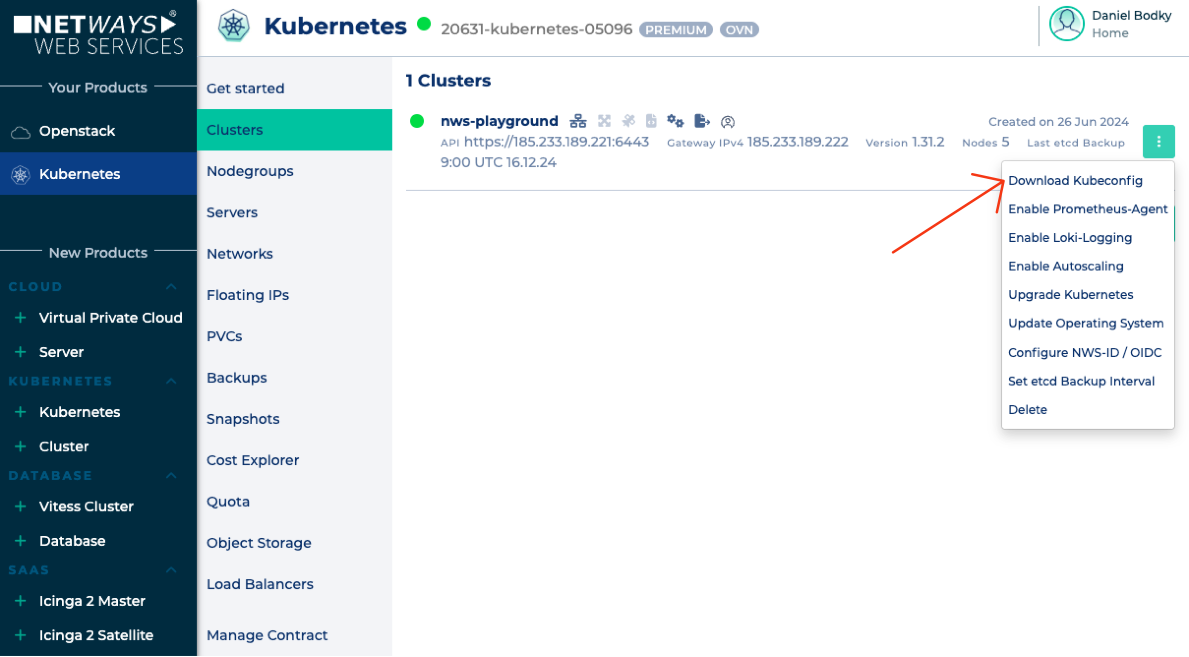
A popup opens with download options for NWS-ID or the Admin context.
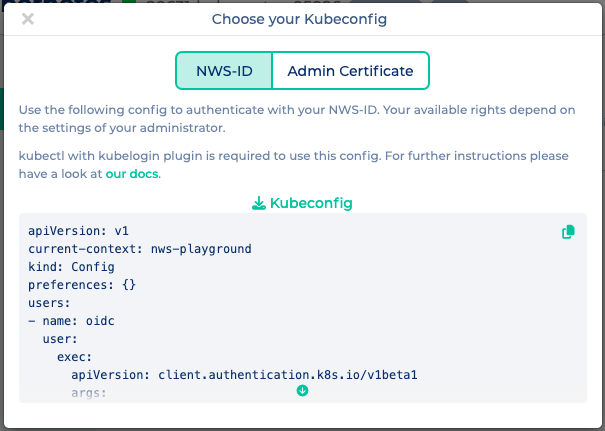
The desired option can be selected by choosing the appropriate tab and clicking kubeconfig to download.
Configuration under $HOME/.kube/config
Afterwards, the kubeconfig is placed under $HOME/.kube/config.
This is the default directory that kubectl searches for a configuration.
Configuration via environment variable $KUBECONFIG
Alternatively, the kubeconfig to use can be set via the $KUBECONFIG environment variable.
This enables working with multiple configuration files.
Configuration of multiple kubeconfigs
If you frequently work with multiple kubectl configurations, third‑party tools are useful.
kubie or
kubectx allow, for example, managing and loading multiple independent configuration files.