Restoring PVC Backups
Backups created in MyNWS are not displayed in the Kubernetes cluster and therefore have to be restored in a different way. To create a new PVC from a backup, the following steps must be performed.
Preparation
For the restoration you need a bash shell with kubectl and a correct kubeconfig. You also need the name of the backup in order to perform the restore in OpenStack.
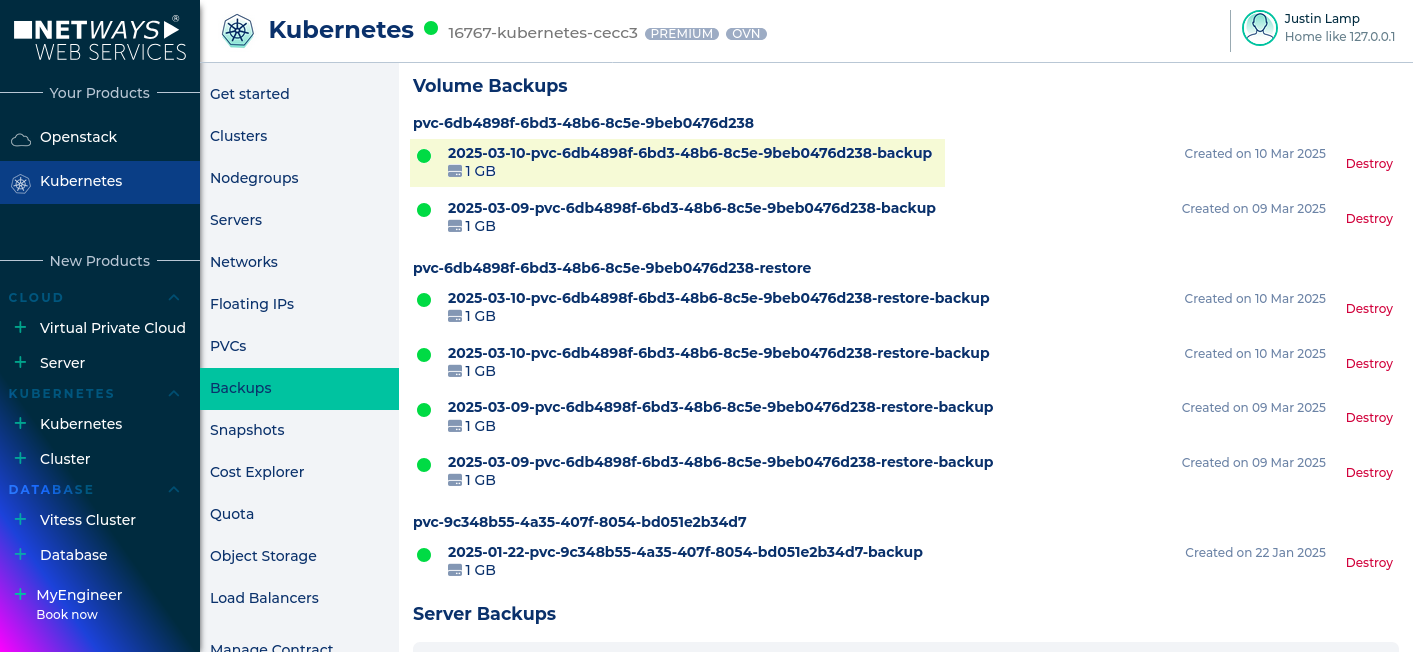
In this case the backup highlighted in yellow is used for the restore. It should be restored into the production Namespace.
The script restore.sh must be placed on the client and made executable.
Execution
The script is interactive and asks all necessary questions for the restore.
What is the name of the Volume Backup in _MyNWS_? (https://my.nws.netways.de/kubernetes/backups)
2025-03-10-pvc-6db4898f-6bd3-48b6-8c5e-9beb0476d238-backup
What is the name of the namespace where the restored pvc should be in? (default: default)
production
---
INFO Restoring "2025-03-10-pvc-6db4898f-6bd3-48b6-8c5e-9beb0476d238-backup" to "pvc-6db4898f-6bd3-48b6-8c5e-9beb0476d238-restore" in Namespace "production".
INFO Waiting for job to complete...Done
INFO Job completed, pvc is now available to be used
INFO Cleaning Up...Done
Now the PVC is present as indicated in the log.
NAME                                               STATUS   VOLUME                                             CAPACITY   ACCESS MODES   STORAGECLASS   VOLUMEATTRIBUTESCLASS   AGE
pvc-6db4898f-6bd3-48b6-8c5e-9beb0476d238-restore   Bound    pvc-6db4898f-6bd3-48b6-8c5e-9beb0476d238-restore   1Gi        RWO            standard       <unset>                 12m